

Overview
The checker accepts the following parameters:bvn— Bank Verification Numberdob— Date of Birth
BVN Input Validation
Thebvn (Bank Verification Number) should be a valid 11-digit number. This number is used for identity verification and must match the following pattern:
- Pattern: 11 digits (
\d{11})
DOB Input Validation
Thedob (Date of Birth) can be entered in various formats. The system checks the provided dob against multiple common date formats to ensure flexibility. The following formats are supported:
dd-MM-yyyyMM-dd-yyyyyyyy-dd-MMyyyy-MM-dddd/MM/yyyyMM/dd/yyyyyyyy/MM/ddyyyy.MM.dddd MMM yyyydd-MMM-yyyy
Multi-Step Validation Process
-
Step 1: BVN Validation
- The
bvnis checked for validity using the regular expression for 11 digits. - If the
bvnis invalid, an error message is returned:Invalid BVN.
- The
-
Step 2: DOB Validation
- The
dobis checked against each of the supported formats. - If the
dobdoes not match any of the allowed formats, an error message is returned:Invalid Date of Birth.
- The
-
Step 3: Successful Validation
- If both the
bvnanddobare valid, a success message is returned indicating that the validation was successful.
- If both the
Example
For a given request:- BVN:
12345678901(Valid 11-digit number) - DOB:
25-12-1990(Valid date indd-MM-yyyyformat)
Getting started
To get started, you can use the BVN Liveness Checker endpoint.Detailed Verification Flow
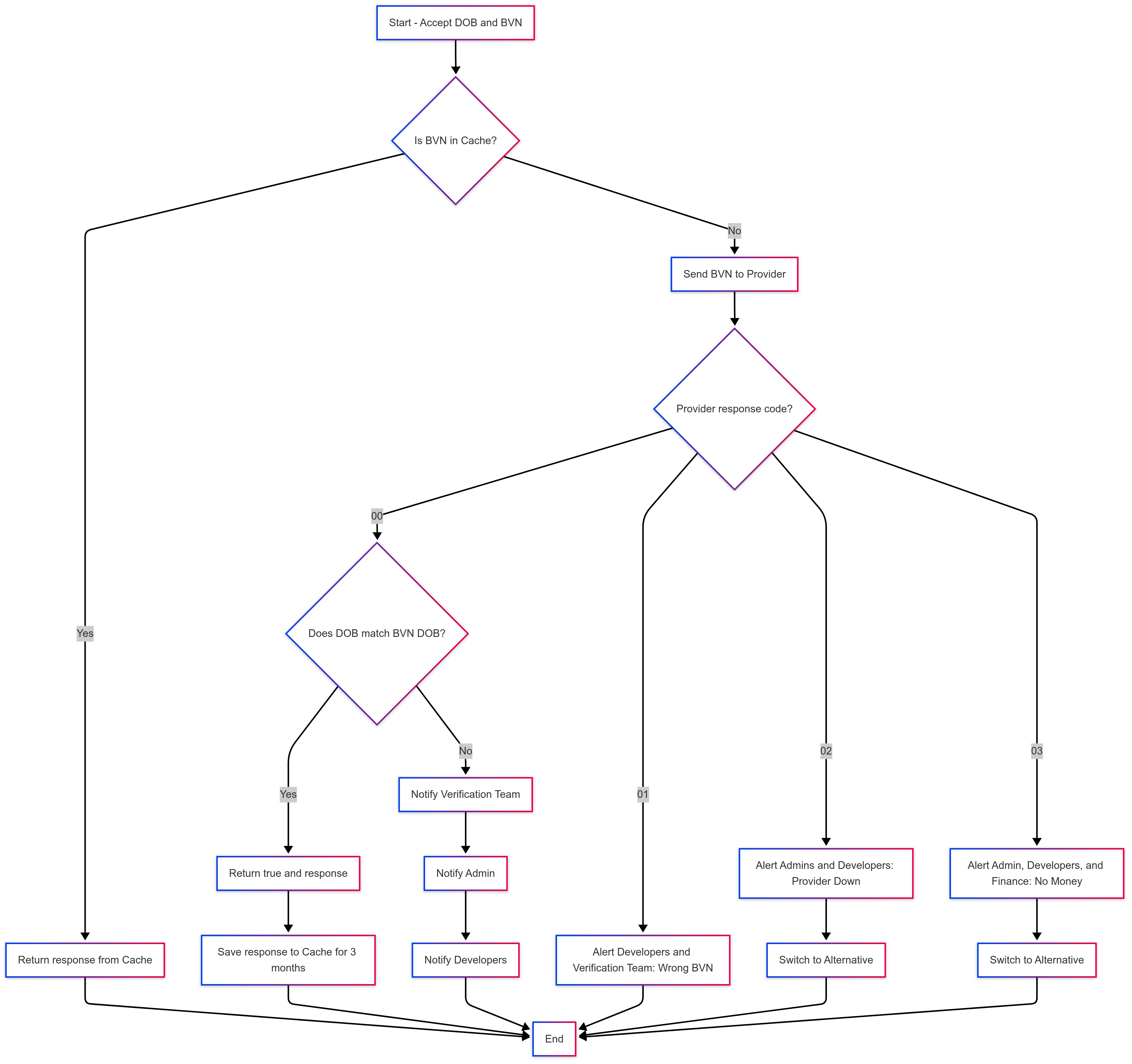
Step 1: Instant Record Lookup
If Sapphire Credit already has a recent record of the BVN:- A verified response is returned immediately.
- No additional verification is performed.
- This helps speed up verification for repeat users.
Step 2: Direct Verification
If the BVN has not been verified recently, Sapphire Credit will contact an identity validation partner to perform live verification.Response Code: 00 – BVN Found and Valid
- Sapphire Credit checks if the provided DOB matches the date of birth associated with the BVN.
- ✅ If DOB matches:
- A successful response is returned.
- The result is stored securely for future requests.
- ❌ If DOB does not match:
- The process is halted.
- Sapphire Credit’s verification, admin, and developer teams are notified.
- The mismatch is logged for investigation.
- ✅ If DOB matches:
Response Code: 01 – Invalid BVN
- The BVN is incorrect or does not exist.
- An alert is sent to Sapphire Credit’s developer and verification teams.
- The process is terminated without further action.
Response Code: 02 – Service Unavailable
- Sapphire Credit’s verification partner is temporarily down.
- The developer and admin teams are notified immediately.
- The system switches to an alternative verification route.
Response Code: 03 – Insufficient Funds for Verification
- The verification partner is unable to process the request due to low balance.
- Sapphire Credit’s admin, developer, and finance teams are alerted.
- An automatic switch to an alternative verification route is triggered.
Alerts and Monitoring
All alerts are routed to the appropriate internal teams with detailed information, including:- User context
- Input BVN and DOB
- Response details
- Timestamp of the event
Example
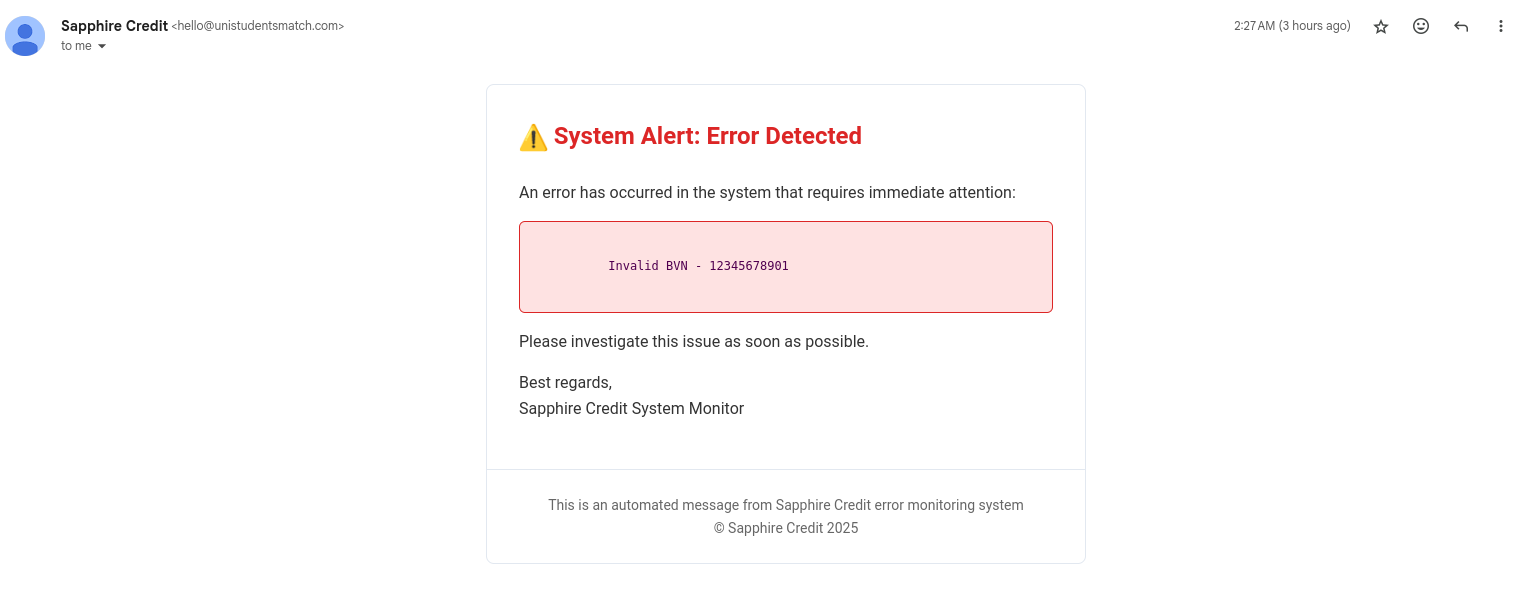 Appropriate channels are also notified of the event on WhatsApp and Slack for prompt actions.
Quick Summary
- Firstly, the bvn is hashed using argon2id to ensure that the data is not exposed.
- Secondly, the bvn is verified against the cache db to check if it has been verified recently.
- If the bvn has been verified recently, the process is terminated and a verified response is returned immediately.
- If the bvn has not been verified recently, Sapphire Credit will contact an identity validation partner to perform live verification.