

Overview
The checker accepts the following parameters:bvn— Bank Verification Number
BVN Input Validation
Thebvn (Bank Verification Number) should be a valid 11-digit number. This number is used for identity verification and must match the following pattern:
- Pattern: 11 digits (
\d{11})
Getting started
To get started, you can use the Credit History Check endpoint.Loan Evaluation – Overview
This system helps determine whether a user’s loan application should be approved or declined based on their financial history.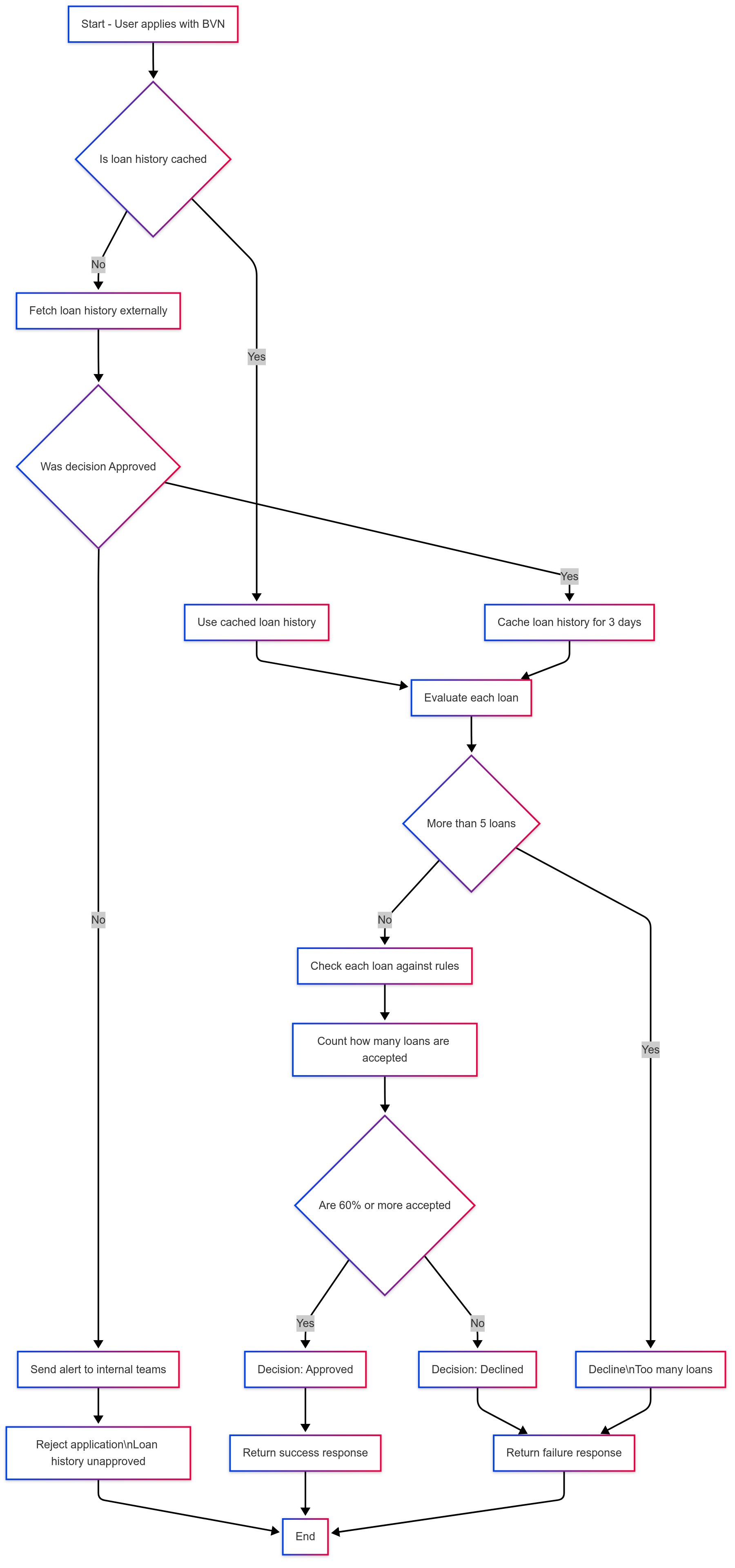 It uses two main processes:
- Loan History Retrieval
- Loan History Evaluation
Step 1: Loan History Retrieval
Before evaluating an application, the system first tries to fetch the user’s loan history using their BVN (Bank Verification Number).Here’s how it works:
- It checks if loan history is already stored in the system (cached).
- If found, it uses that data immediately to speed things up.
- If not found, it retrieves the loan history from an external service.
- If the history indicates issues, it sends an alert to the relevant teams and stops the process.
- If the history is acceptable, it saves it in the system for future use (for up to 3 days).
Step 2: Loan History Evaluation
Once the system has the loan history, it evaluates each loan record to decide if the application should be approved.Here’s what the system looks for:
- No loan history at all → The application is automatically approved.
- Too many existing loans (more than 5) → The application is declined.
- Individual loan checks:
- Performing loans with no arrears → ✅ Accepted
- Minor arrears (1–30 days), marked as “pass and watch” → ✅ Accepted
- Substandard loans with minor overdue amounts → ✅ Accepted
- Doubtful loans with moderate arrears → ✅ Accepted
- Lost loans with over 90 days in arrears → ❌ Rejected
- Anything else → ✅ Accepted by default
Final Decision
After reviewing all loans:- If 60% or more of the loans are acceptable → The application is approved.
- If less than 60% are acceptable → The application is declined.
Quick Summary
- Retrieve the user’s loan history using their BVN.
- Evaluate each loan based on a set of rules.
- Decide:
- If most loans are okay → The user is approved.
- If many loans are problematic → The user is declined.
- Notify relevant teams if there’s a rejection.
- Cache the result for next time.